STIIIZY Bar Battery Instructions: How to Set Up and Use Your Bar
The STIIIZY Bar holds two STIIIZY pods at once and gives you more settings than any other STIIIZY battery. These STIIIZY Bar battery instructions show you exactly which buttons to press to turn it on, change voltage, use preheat and more.
Quick answer: Press the top button 5 times quickly to turn the Bar on. Insert two STIIIZY pods, press the top button 3 times to change voltage, use the bottom switch to set airflow, then press the button or simply inhale.
STIIIZY Bar Controls at a Glance
| Action | How to do it |
|---|---|
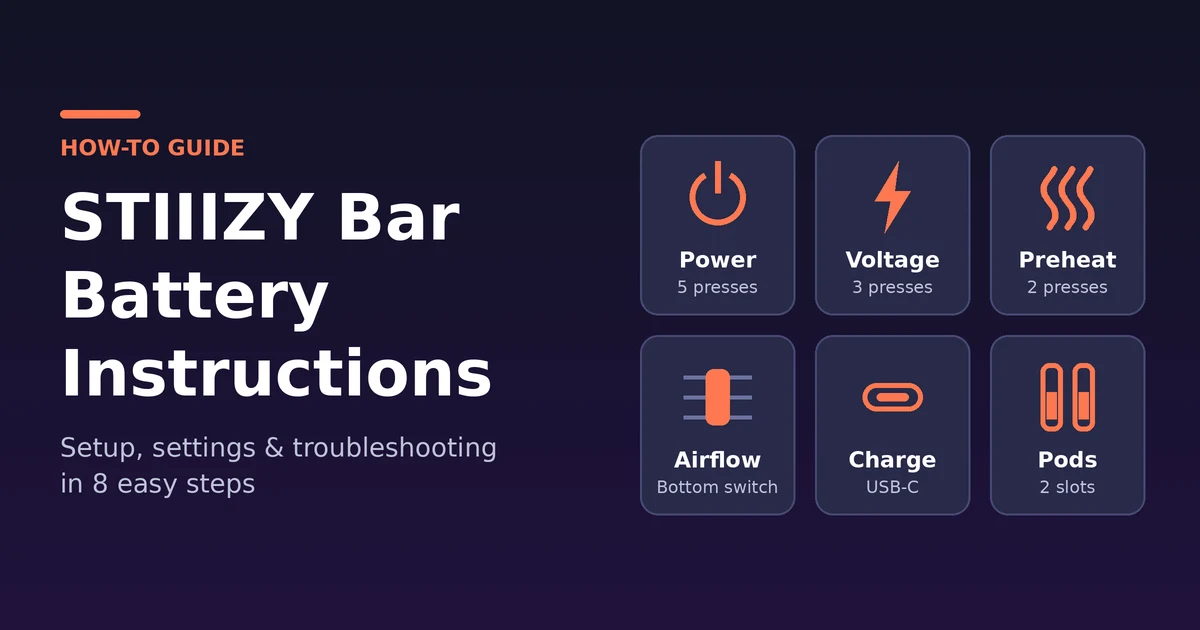
| Power on or off | Press the top button 5 times within 2 seconds |
| Change voltage | Press the top button 3 times within 1.5 seconds |
| Preheat | Press the top button 2 times |
| Adjust airflow | Slide the bottom switch to Low, Medium or High |
| Check oil level | Press the secondary button to light up the pod window |
| Take a hit | Press the button or simply inhale |
Step 1: Charge the Battery
Charge the Bar fully before first use. Plug a USB-C cable into the charging port and connect it to a wall adapter or computer. The LED display shows the battery level as it charges. Unplug the cable once it’s full. The 420mAh battery lasts a good while between charges, depending on your settings and use.
Step 2: Turn It On
Press the top button 5 times quickly, within 2 seconds. The display lights up when the Bar powers on. Use the same 5 quick presses to turn it off, which helps prevent accidental firing in your pocket or bag.
Step 3: Insert Your Pods
The Bar works with two compatible 1-gram STIIIZY pods.
- Hold each pod with the mouthpiece facing up.
- Slide it into a chamber until it clicks into place magnetically.
- Fill both chambers.
Important: the Bar needs both slots filled to work properly. If you only want to use one pod, place a Proxy Pod in the empty slot. The Bar doesn’t fit 510-thread cartridges or other brands’ pods.
Step 4: Change the Voltage
Press the top button 3 times quickly, within 1.5 seconds, to cycle through the four levels: Low, Medium, High and Max. The display shows your current setting.
Start on Low with a new pod for the best flavor, then step up for more vapor. To unlock Max, set the airflow to High and make sure two pods sit in the device.
Step 5: Adjust the Airflow
Slide the bottom switch to choose Low, Medium or High airflow. Low gives a tighter, more concentrated draw, while High gives a looser, airier pull.
Step 6: Use Preheat
Thick oil can make the first hit feel harsh, especially after the Bar sits somewhere cool. Press the top button 2 times to start preheat. A cloud symbol blinks on the screen while the oil warms up.
Step 7: Take a Hit
Choose either method:
- Button activation: press and hold the button while you inhale.
- Draw activation: simply inhale, and the Bar fires automatically.
Take slow, steady draws for the smoothest experience.
Step 8: Check Your Oil Level
Press the secondary button to light up the pod window from behind. This makes it easy to see how much oil remains in each pod.
Troubleshooting
The Bar won’t fire. Check that it’s switched on with 5 quick presses, that both slots hold a pod or Proxy Pod, and that the battery has charge.
I can’t select Max. Set the airflow switch to High and make sure two pods sit in the device.
The display is blinking. Blinking usually signals low battery or a connection issue. Charge the battery, then remove and firmly reinsert each pod.
A pod won’t hit. Remove it, wipe the contacts gently with a dry cotton swab, then click it back in.
It stops during a long draw. Built-in protection cuts power during very long draws. Release, wait a moment and try shorter draws.
Care and Safety Tips
Keep your Bar clean, dry and away from heat and direct sunlight. Turn it off when you’re not using it. Never use a battery that looks damaged, swollen or gets unusually hot. If the upper housing gets damaged, replace the part rather than forcing or modifying it.
STIIIZY Bar Battery Instructions FAQ
How do I turn on the STIIIZY Bar?
Press the top button 5 times within 2 seconds.
How do I change the voltage?
Press the top button 3 times within 1.5 seconds.
Can I use just one pod?
Yes, but place a Proxy Pod in the empty slot, since the Bar needs both slots filled.
How do I use preheat?
Press the top button twice. A blinking cloud symbol shows preheat is running.
Explore all features on our STIIIZY Bar battery page, or browse STIIIZY pods to fill both slots.